
GroupMe
GroupMeCommunication
4.6166.30K Reviews
- Version
- 16.36.2
- Installs
- 10.00M
- Age Rating
- Teen
Screenshots



Our Review of GroupMe
 Analysis by Appyee
I usually judge a group-chat app by what happens after the first burst of enthusiasm: can it keep a family plan, a work thread, and a friends’ chat from becoming one noisy blur? GroupMe is built around that everyday problem. It is a free communication app from GroupMe, and its focus is shared conversations rather than trying to replace every tool on your phone. That narrow purpose is useful, but it also means the best reason to choose it is having groups that genuinely benefit from a common place to talk.
What I would consider before joining another chat
Group chats can collect personal details quickly: a meeting place, a photo, a change of plans, or a message meant for only one circle of people. I would treat any group conversation accordingly and check who is in the group before posting something sensitive. A chat being convenient does not make it the right place for private information, and I would not assume that muting a conversation changes who can see its messages.
The app’s audience is rated Teen, so I would also think about the people in a group and what is being shared there, especially when younger users are involved. That label is a useful reminder to use sensible judgment; it is not a substitute for deciding whether a particular group, its members, and its conversation are appropriate.
Small choices that make group chats easier to manage
One practical habit is to mute a group when you need quiet rather than leaving immediately. That can work well for a busy planning thread that you only need to check occasionally. Before doing so, I would make sure I know how I will keep track of anything time-sensitive; fewer alerts are helpful only if important changes do not slip past unnoticed.
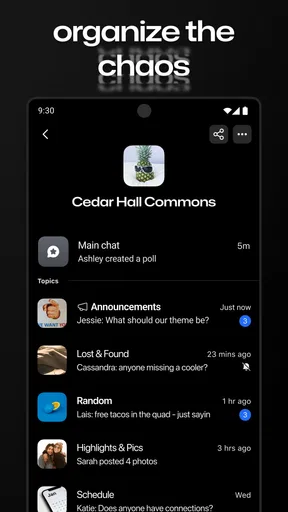
Polls can also reduce the back-and-forth that makes group planning drag on. I would use one to narrow down a choice, then put the settled details in a clear message so late readers can catch up. A poll is a convenient way to gather preferences, not a guarantee that everyone has seen it or that the result covers every practical constraint.
Where it fits, and where I would look elsewhere
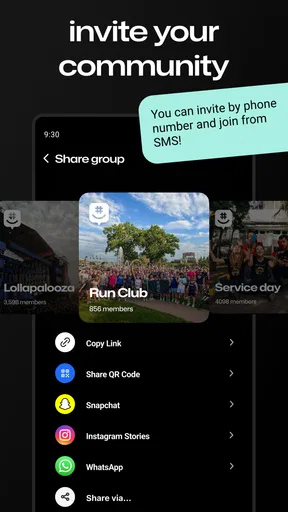
For a family arranging a shared meal, friends coordinating a trip, or a club keeping members in the loop, a dedicated group space can be easier to follow than scattering messages across several individual chats. GroupMe’s support for people on Android and iOS is especially helpful when a group has a mix of phones. Email invitations can help bring someone into the conversation without first asking them to find the right app contact.
I would be less likely to choose it for a one-to-one conversation that already works well in my usual messaging app, or for a team whose work depends on more formal task tracking and document management. Compared with ordinary messaging apps, its appeal is the emphasis on group coordination and tools such as polls and events. If a group mainly needs a private, direct exchange, or wants a broader work platform, another option may fit better. The right choice depends on what the group actually needs, not on how many features an app can display.
How I would handle a typical planning day
Imagine a few friends trying to settle a weekend get-together. I would create one group, use a poll to gather preferences, and share the location once the plan is settled. If the chat becomes busy while I am working, I could mute its notifications and check back when I have time. That workflow keeps decisions together, but it still relies on someone posting the final details plainly; otherwise, a person who missed the conversation may not know which option won.
For a recurring group, I would keep the conversation’s purpose clear and avoid adding people who do not need to be there. That is both a courtesy and a simple way to reduce accidental oversharing. If the group has become irrelevant, leaving is an available choice, though I would consider whether a quick note is useful before I go. Those small decisions matter more to a comfortable chat than constantly adjusting settings.
The Ultimate Group Chat Experience
When I first downloaded GroupMe, I was amazed at how easily I could set up a group chat. The app lets you create groups for anything and everything—be it for family, friends, workmates, or even your book club. What’s cool is that it doesn’t matter if your friends or family are on Android or iOS; everyone can join in on the fun. You can even add people using email! How neat is that?
Features That Keep You Hooked
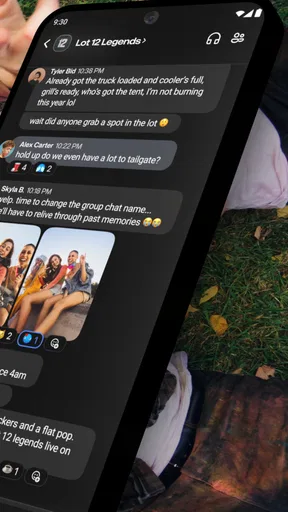
Once you’re inside the app, you'll notice it has a clean and intuitive interface. There’s no clutter to distract you from your chats. You can send text messages, images, and even GIFs. Oh, and speaking of GIFs, GroupMe has a built-in GIF search, so your conversations can be as lively as you want them to be.
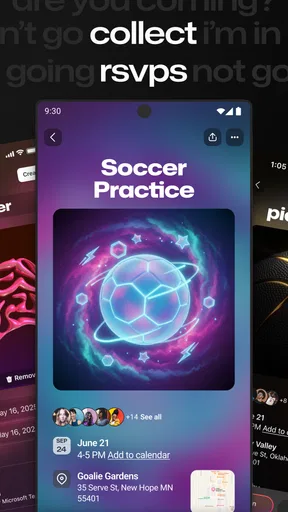
Another feature I adore is the ability to create events and polls. Planning a get-together? Just create a poll and let everyone vote on the best date. It’s a lifesaver for those who can’t seem to agree on anything. Plus, the app integrates seamlessly with your calendar, so you’ll never miss an important event.
A Few Extras to Keep It Interesting
GroupMe isn’t just about text. You can also share locations with your group, making meet-ups in unfamiliar places a breeze. And if you’re worried about privacy, don't fret. You can mute notifications for specific groups or even leave a group without causing a scene. It’s all about making your experience as comfortable as possible.
One quirky feature I stumbled upon is the meme generator. Yes, you read that right. You can create memes directly within the app. It’s perfect for adding a bit of humor to your conversations. Trust me, it’s a game-changer when you need a good laugh.
Keeping It Personal
What I truly appreciate about GroupMe is the personal touch it offers. You can set custom avatars for your groups, and there’s a gallery feature that keeps all your shared photos and videos in one place. It’s like a digital scrapbook for each group, and I find myself scrolling through old pictures whenever I need a dose of nostalgia.
If you’re the type who loves customization, you’ll be glad to know you can change the app’s theme to suit your mood. It’s a small touch, but it makes the app feel more personal and less generic.
Getting Started
Getting started with GroupMe is a breeze. You just download the app from the Google Play Store or the Apple App Store, sign in with your Microsoft account (or create a new one if you don’t have one), and you’re all set. The setup process is straightforward, and you’ll be creating groups and chatting away in no time.
Another fantastic thing is that it’s completely free. There are no hidden costs or premium features locked behind a paywall. GroupMe offers everything upfront, which is something I truly appreciate in an app.
It has been around since November 3, 2010, and version 15.30.18 is the current version. Its 4.6 average from around 605,000 ratings, alongside more than 10 million installs, suggests that many people have made it part of their group-chat routine. It is intended for teens and older, and it requires Android 9 or later. Those details are useful when deciding whether it will work for your phone and the people you want to invite.
Final Thoughts
In a world full of communication apps, GroupMe stands out by keeping things simple yet effective. It’s perfect for anyone who wants an easy way to manage multiple group chats without the bells and whistles that other apps bombard you with. Whether you’re coordinating with family, planning a party, or just chatting with friends, GroupMe has got you covered.
So, if you’re tired of the chaos that comes with managing group chats on multiple platforms, give GroupMe a try. It’s like having a personal assistant for your social life, all wrapped up in a neat little app. Happy chatting!
My recommendation is cautious rather than automatic: it makes the most sense when a group will actually use its shared space, and when its members are comfortable with the app’s approach to conversation. If you mainly need a straightforward group thread with handy planning extras, it is an easy option to consider. If your priority is a different kind of messaging experience, or you would rather not move a particular conversation into another app, sticking with the tool your group already uses may be the better call.
Privacy and Permissions
See what permissions an app requests and how it handles your data.
- Identity
- find accounts on the device, add or remove accounts
- Contacts
- find accounts on the device, read your contacts
- Location
- approximate location (network-based), precise location (GPS and network-based)
- Phone
- read phone status and identity
- Photos/Media/Files
- read the contents of your USB storage, modify or delete the contents of your USB storage
- Storage
- read the contents of your USB storage, modify or delete the contents of your USB storage
- Camera
- take pictures and videos
- Microphone
- record audio
- Wi-Fi connection information
- view Wi-Fi connections
- Device ID & call information
- read phone status and identity
- Other
- view network connections, create accounts and set passwords, pair with Bluetooth devices, full network access, change your audio settings, read sync settings, run at startup, reorder running apps, draw over other apps, use accounts on the device, control vibration, prevent device from sleeping, toggle sync on and off, install shortcuts
Verdict
Strengths of GroupMe
- Seamless group messaging experience.
- Easy media sharing within chats.
- Integration with emojis and GIFs.
- Customizable notifications for chats.
- Available on multiple platforms.
Limitations of GroupMe
- Limited file sharing options.
- No end-to-end encryption.
- Occasional app crashes reported.
- Lacks advanced search features.
- No video calling capability.
Similar Picks in This Category
View All
Google Messages
Google LLC4.6

Gmail
Google LLC4.1

Google Meet
Google LLC4.4

Google Chrome
Google LLC4.1

WhatsApp Messenger
WhatsApp LLC4.6

Carrier Services
Google LLC4.2
Frequently Asked Questions
What is GroupMe and how does it work?
GroupMe is a free messaging application that allows users to create groups for seamless communication. It supports sharing text messages, photos, and videos. You can also send direct messages to individuals. The app integrates with your contacts, making it easy to invite others to join your groups.
Is GroupMe available on all devices?
Yes, GroupMe is available on both Android and iOS devices, as well as on the web. This makes it versatile for users who switch between different devices. The app syncs your conversations across all platforms, ensuring you can stay connected wherever you are.
Are there any privacy concerns with using GroupMe?
GroupMe values user privacy and offers features to control who can join or see your group conversations. You can also mute notifications for specific chats. However, it’s important to review their privacy policy and adjust your settings to ensure your data and communications are protected.
Can I customize notifications in GroupMe?
Yes, GroupMe provides extensive notification customization options. You can mute specific chats, customize sound alerts, and even turn off notifications completely. This allows you to manage how and when you receive updates, ensuring a tailored communication experience.
Does GroupMe support multimedia sharing?
Absolutely, GroupMe supports a variety of multimedia sharing options. You can send photos, videos, GIFs, and even location data. There are also integrated emoji and meme generators to enhance your messaging experience, making it a fun and interactive platform for group chats.
